Blog / · Updated
Best Shopify bundle apps compared for 2026
The best Shopify bundle apps compared on what each is built for, pricing model, one strength and one limitation, plus how to choose by store situation.
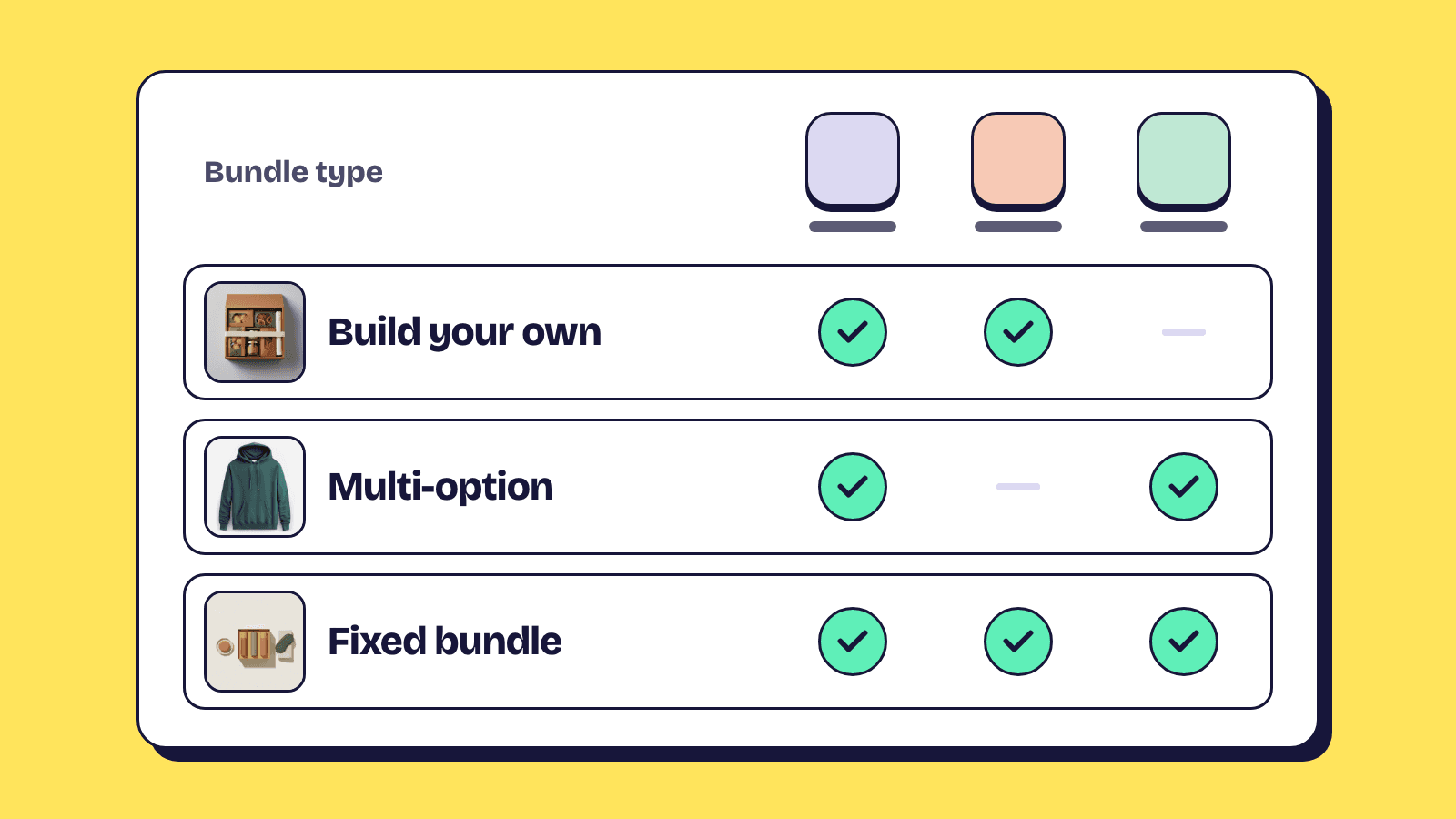
The best Shopify bundle apps are not interchangeable. Some are built for fixed kits, some for shoppers building their own box, some for warehouses that need component-level inventory. This roundup compares six of them on what each is built for, how it is priced, one strength and one limitation, then gives you a way to choose by your store's situation.
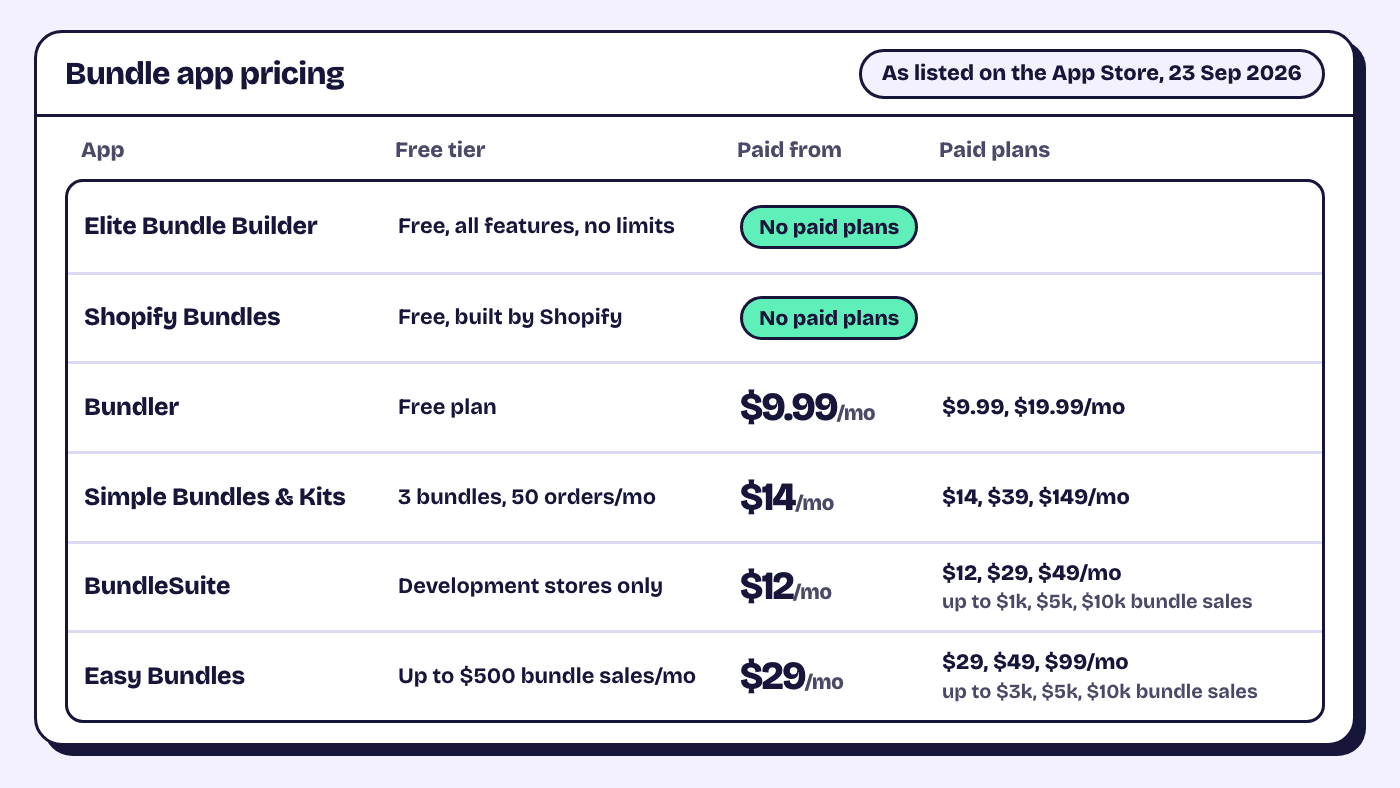
One thing first: Elite Bundle Builder is our app. We have kept our own entry to the same format as the others and stated every competitor fact as it appeared on the App Store on 23 September 2026, with a link so you can check. Plans change, so treat the pricing lines as a snapshot.
The six apps at a glance
| App | Built for | Pricing model |
|---|---|---|
| Elite Bundle Builder | Build your own bundles and multi-option kits | Free, all features |
| Shopify Bundles | Fixed bundles | Free, built by Shopify |
| Bundler | Fixed bundles and volume discounts | Free plan, then $9.99 or $19.99/mo |
| Simple Bundles & Kits | Inventory sync and fulfilment accuracy | Free plan, then $14, $39, $149/mo |
| BundleSuite | Full-page builders: build your own, mix-and-match, build-a-box | Free on dev stores, then $12, $29, $49/mo by bundle sales |
| Easy Bundles | Broad bundle toolkit with an SDK | Free to $500 bundle sales/mo, then $29, $49, $99/mo |
Elite Bundle Builder, free build your own bundles with tiered discounts
Built for: stores that want shoppers to build a box, routine, sampler or gift set across steps, and stores selling a kit where the shopper picks a size or colour for each item.
Pricing: free. All features, no limits, no trial and no card. The pricing page is short because there is nothing to compare.
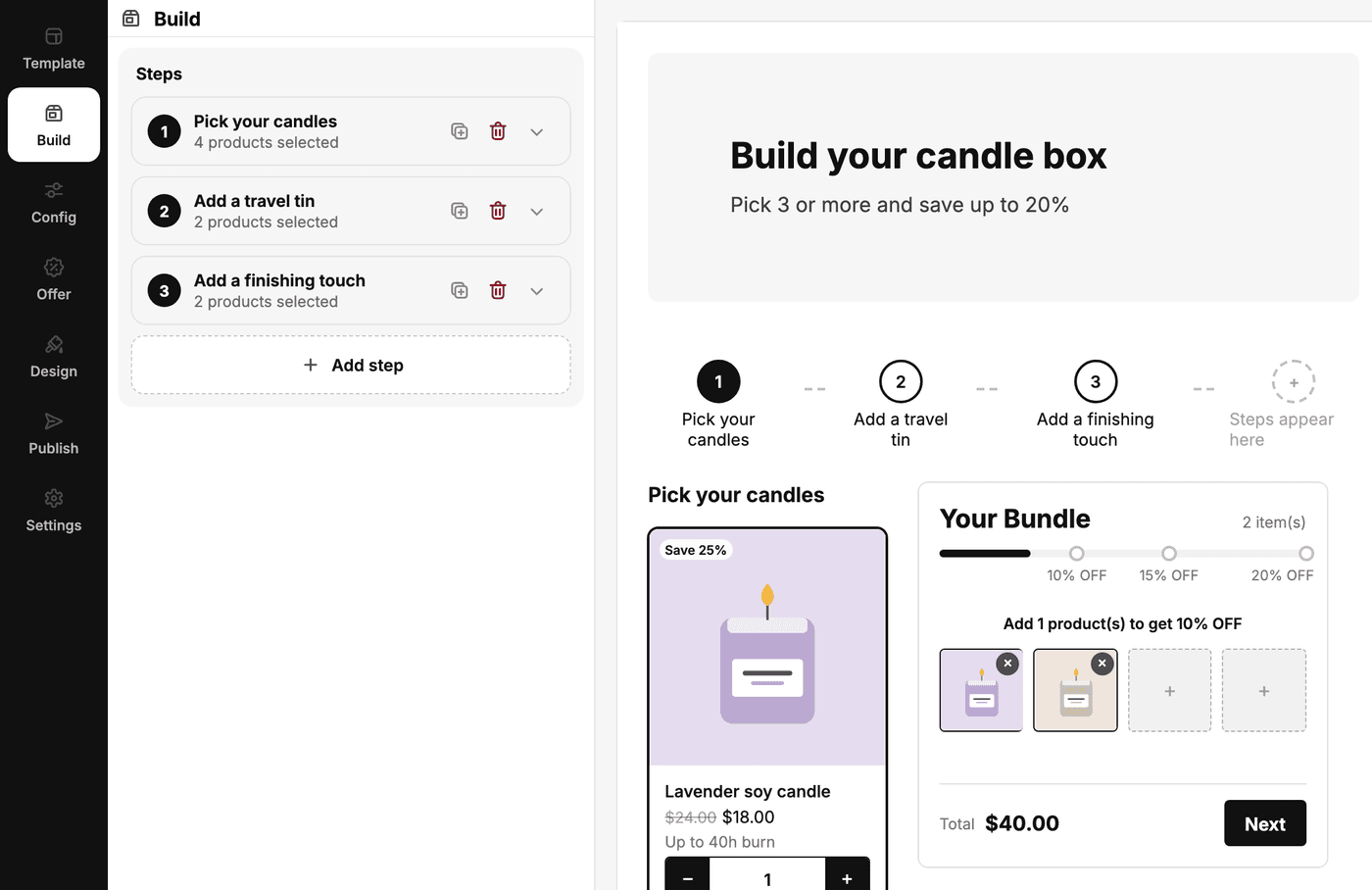
Strength: the amount of control per bundle without code. Each step draws from specific products or a collection, with its own min and max by item count or amount spent, a one-of-each rule, free gift steps, and steps that appear only once an earlier step has certain picks. Discounts are tiered by item count or order total, calculated four ways, and applied at checkout through Shopify Functions with no code. Design is per bundle, every storefront string is translatable, and there is a JavaScript SDK for fully custom UIs. Product data is set on the cards themselves: click a spot in the live preview to show the SKU, vendor, stock left, compare-at savings or a metafield as a badge or a line, on the product card, in quick view and on each cart item, plus cart lines such as "Add 2 more for 10% OFF" that update as the shopper picks. Each bundle can also promote itself with an upsell card on related product pages, and its views, clicks and orders show in that bundle's analytics. Build your own and multi-option bundles can be sold on subscription too, on the plans your subscription app already offers. Read the build your own bundle page and the multi-option bundle page for the two types, and the full feature list for everything else.
Limitation: it does not do volume breaks, and its upsell shows on product pages only, not in the cart or at checkout. Subscriptions need a separate subscription app for the plans and renewal billing, every product in the bundle has to be in the same plan, and they do not cover fixed bundles. Its fixed bundles follow Shopify's own bundle limits: up to 30 products, 3 options and 2,048 variants. If your whole plan is "sell these three products together at one price" and nothing else, the native Shopify Bundles app already does that.
Shopify Bundles, the free native app for fixed bundles
Built for: fixed bundles. A bundle is a set of products sold together as one product, and the shopper does not choose what goes in it. Shopify documents how it works on the bundles help page.
Pricing: free, and built by Shopify. Install it from the Shopify Bundles listing.
Strength: it is Shopify's own app, so it sits inside the product admin and uses the platform's native bundle support with nothing extra to install in your theme.
Limitation: fixed bundles only. There is no build-your-own flow, no steps, and no tiered discount ladder. If you need any of those you will add a second app anyway.
Bundler, a budget all-rounder for fixed bundles and volume discounts
Built for: fixed bundles and volume discounts, with a mix-and-match option and landing pages on paid plans.
Pricing: free plan, then $9.99 a month (Premium) and $19.99 a month (Executive, which adds analytics), as listed on the Bundler App Store page on 23 September 2026.
Strength: breadth for the price. A store that wants a fixed bundle, a quantity break and a mix-and-match offer in one app at a low monthly cost will find all three here.
Limitation: mix-and-match and landing pages sit on the $9.99 plan and analytics on the $19.99 plan, so the free plan is for fixed bundles and volume discounts only. See our Bundler comparison for a feature-by-feature view.
Simple Bundles & Kits, built around inventory and fulfilment
Built for: stores where the bundle has to be correct in the warehouse, not just on the storefront. The listing leads with inventory sync, 3PL support and fulfilment accuracy, and also covers build your own bundles, BOGO and upsells.
Pricing: free for 3 bundles and 50 orders a month, then $14, $39 and $149 a month, as listed on the Simple Bundles App Store page on 23 September 2026.
Strength: the operations side. If you ship through a 3PL and need each component of a bundle to appear on the pick list, this is the app the listing is written for.
Limitation: the free plan caps at 3 bundles and 50 orders a month, so a store that expects bundles to sell in any volume is on a paid plan from the start. Our Simple Bundles comparison has the detail.
BundleSuite, full-page bundle builders priced on bundle sales
Built for: full-page build your own, mix-and-match and build-a-box bundles, with fixed bundles, BOGO, quantity breaks and free gifts in the same app.
Pricing: free on development stores, then $12, $29 and $49 a month for up to $1,000, $5,000 and $10,000 in bundle sales a month, as listed on the BundleSuite App Store page on 23 September 2026.
Strength: breadth of bundle types in one app at a mid-range price.
Limitation: the price rises with the revenue your bundles make, and the free tier is for development stores rather than live ones. Read our BundleSuite comparison before choosing between the two.
Easy Bundles, a broad bundle toolkit priced on bundle sales
Built for: stores that want a broad bundle toolkit, including step-by-step builders, subscription bundles and a developer SDK for custom storefronts.
Pricing: free up to $500 of bundle sales a month (mix-and-match, fixed and volume bundles), then $29, $49 and $99 a month for up to $3,000, $5,000 and $10,000 in bundle sales, as listed on the Easy Bundles App Store page on 23 September 2026.
Strength: depth. It is one of the more complete build-your-own apps on the store, and the SDK matters if you have developers who want to render the bundle themselves.
Limitation: the pricing is tied to bundle sales, and the step-by-step builders start on the $29 plan, which is also where you land once you pass $500 in monthly bundle sales. For a store where bundles become a real channel, the monthly cost grows with success. Our Easy Bundle Builder comparison lays the two feature sets side by side.
How to choose by your store's situation
You sell a fixed set at one price and nothing else. Shopify Bundles is free and native, and Elite Bundle Builder's fixed bundles sit on the same Shopify bundle system, with an items list on the product page and upsells. If you will also want shoppers to build their own box later, one app covers both.
Shoppers should build their own box, routine or gift set. You want a build-your-own app. Elite Bundle Builder, BundleSuite, Easy Bundles and Simple Bundles & Kits all list it; the difference is price and how much control you get per bundle. If the monthly fee matters, Elite Bundle Builder is free at any volume and the other two scale with revenue.
You sell a kit but shoppers need to pick sizes or colours. That is a multi-option bundle. Elite Bundle Builder handles it on the product page, replacing the theme price with the bundle total and using the theme's own add to cart button. The bundle types docs explain when to use which.
Shoppers choose on facts such as diet, size, SKU or stock. Then the cards need more than a title and a price. In Elite Bundle Builder you click a spot on a card in the live preview and pick what it shows, from the product's own fields or its metafields, with no theme code; the product data docs list every spot.
Your warehouse or 3PL needs component-level accuracy above all. Look at Simple Bundles & Kits first. Its whole pitch is fulfilment, and the paid plans are the cost of that focus.
You want quantity breaks on a single product. Bundler does volume discounts on its free plan. Elite Bundle Builder does not offer volume breaks, so do not pick it for that.
Our honest opinion: pick by bundle type first and price second. An app that is the wrong shape for your offer costs more in workarounds than any subscription, and every app on this list is good at the thing it is built for.
Frequently asked questions
Can I use two bundle apps on the same store?
Yes, and it is common. Shopify Bundles for a couple of fixed kits and a build-your-own app for the pick-and-mix page is a normal pairing. Keep each bundle in one app so discounts and inventory are handled in one place per product.
Do bundle apps affect inventory?
It depends on the app. Elite Bundle Builder groups the picked items into one cart line and tracks inventory on the real products, so selling a bundle reduces each component's stock. Check how each app handles components before you rely on it for stock counts.
Which app is best if I have no budget?
Shopify Bundles is free for fixed bundles. Elite Bundle Builder is free for build-your-own, multi-option and fixed bundles with every feature and no order or bundle caps. Bundler and Simple Bundles & Kits have free plans with limits, so read the plan details on the App Store before you commit.
Want to try the free option for build-your-own and multi-option bundles? Install Elite Bundle Builder from the Shopify App Store.