Blog / · Updated
How do Shopify bundles work in cart, checkout and orders
How do Shopify bundles work? Cart transform, inventory on the real products, discounts at checkout, what the order and refund look like, native vs apps.
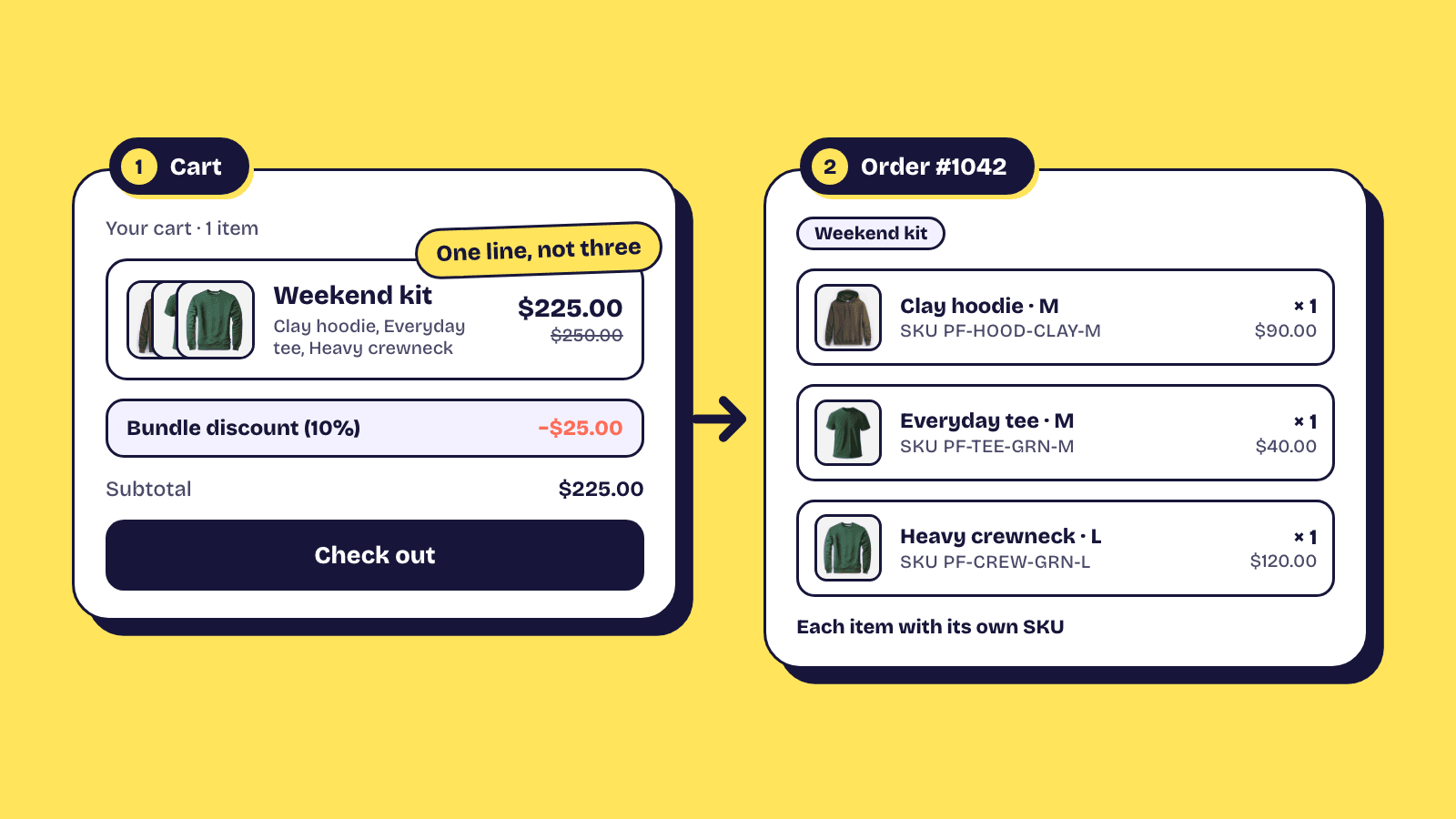
How do Shopify bundles work once a shopper clicks add to cart? The short version: Shopify merges the picked products into one cart line with the components listed underneath, keeps inventory on the real products, and applies the discount at checkout through a Shopify Function. The order shows the bundle as a group of line items so you fulfil the actual products, not a placeholder. This post goes through each stage in plain terms, then explains where the free Shopify Bundles app stops and where a bundle builder app takes over.
A bundle is a parent product with components
Every bundle on Shopify starts as a normal product, called the parent. The parent is what gets a page, a title and a price display. The products a shopper actually receives are the components. Shopify's bundle model links the two so the cart, checkout and order all know that the parent stands for a set of components.
In Elite Bundle Builder, the parent product is created for you when you create a bundle. Its name, images, description and SEO are edited on the Shopify product like any other, and the editor's Settings tab links straight to it. What you configure in the app (steps, rules, discount tiers, design) is stored against that product.
The cart transform merges the picks into one line
When a shopper builds a bundle and adds it, a cart transform runs. This is a Shopify Function that reads the cart and merges the picked products into a single bundle line, with each component recorded inside it. Shopify's developer documentation on product bundles describes it directly: the cart page shows the bundle parent with the option to return the components, and checkout presents the bundle products as a group of lines.
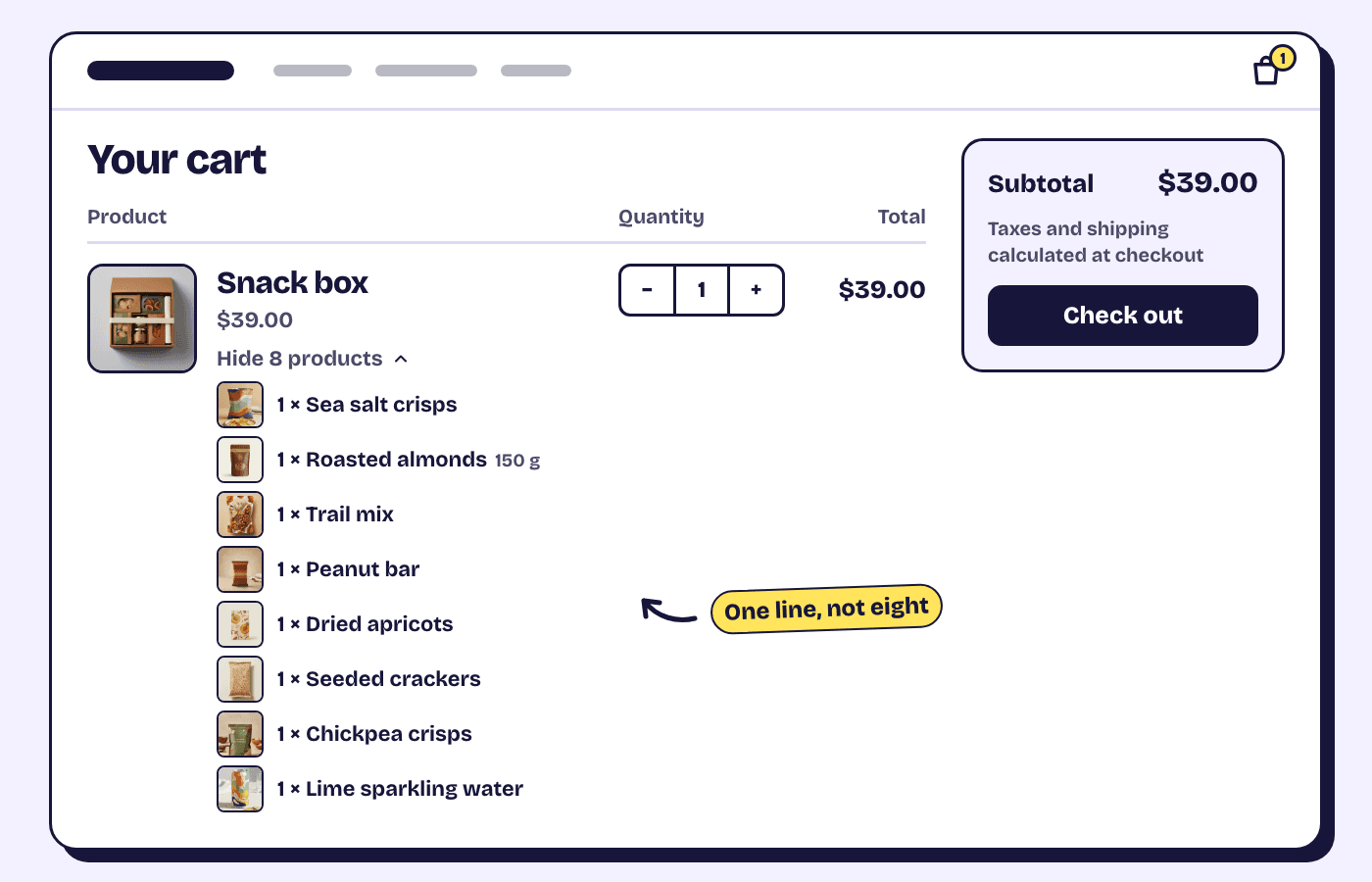
For the shopper this means one line in the cart reading, say, "Snack box", with the eight picks listed beneath it. The line is the bundle, not eight separate products, so they cannot quietly drop one pick and keep the tier. For you it means the cart never shows a bundle that has silently lost a component.
Inventory stays on the real products
A bundle does not have its own stock. The components do. When a bundle order goes through, each component's inventory drops by the quantity in the bundle. Shopify's help centre on bundle eligibility and considerations puts it plainly: bundle inventory is determined by the inventory levels of each product included, and the product with the lowest inventory determines how many bundles can be sold.
In practice this is the behaviour you want. A product that sells out on its own product page also sells out inside every bundle that includes it, with no second stock count to keep in sync. In Elite, out-of-stock products show as sold out on the bundle page and cannot be added, or you can hide them from the catalogue entirely with a Design setting.
Discounts are applied at checkout by a Shopify Function
The discount is the second Function involved. Shopify's discounts documentation explains that Shopify executes the Function to calculate discounts in real time as buyers add products to their cart, and that Functions can apply reductions to specific products or the whole purchase without needing a discount code.
A bundle builder app uses this to read the bundle line, check how many items it holds or what it totals, and apply the tier the shopper reached. Elite supports tiers by item count or order total, calculated as a percentage, a fixed amount, a fixed bundle price, or an amount off per item. The shopper sees the saving on the checkout page with no code to type. The bundle discounts page lists the options, and the discount setup docs have a testing checklist to run before you go live.
The thing to remember is that the discount lives at checkout, not on the product page. A bundle page can show a progress bar or a savings hint, but the number that counts is the one checkout calculates. Always test there.
The order shows a nested group of line items
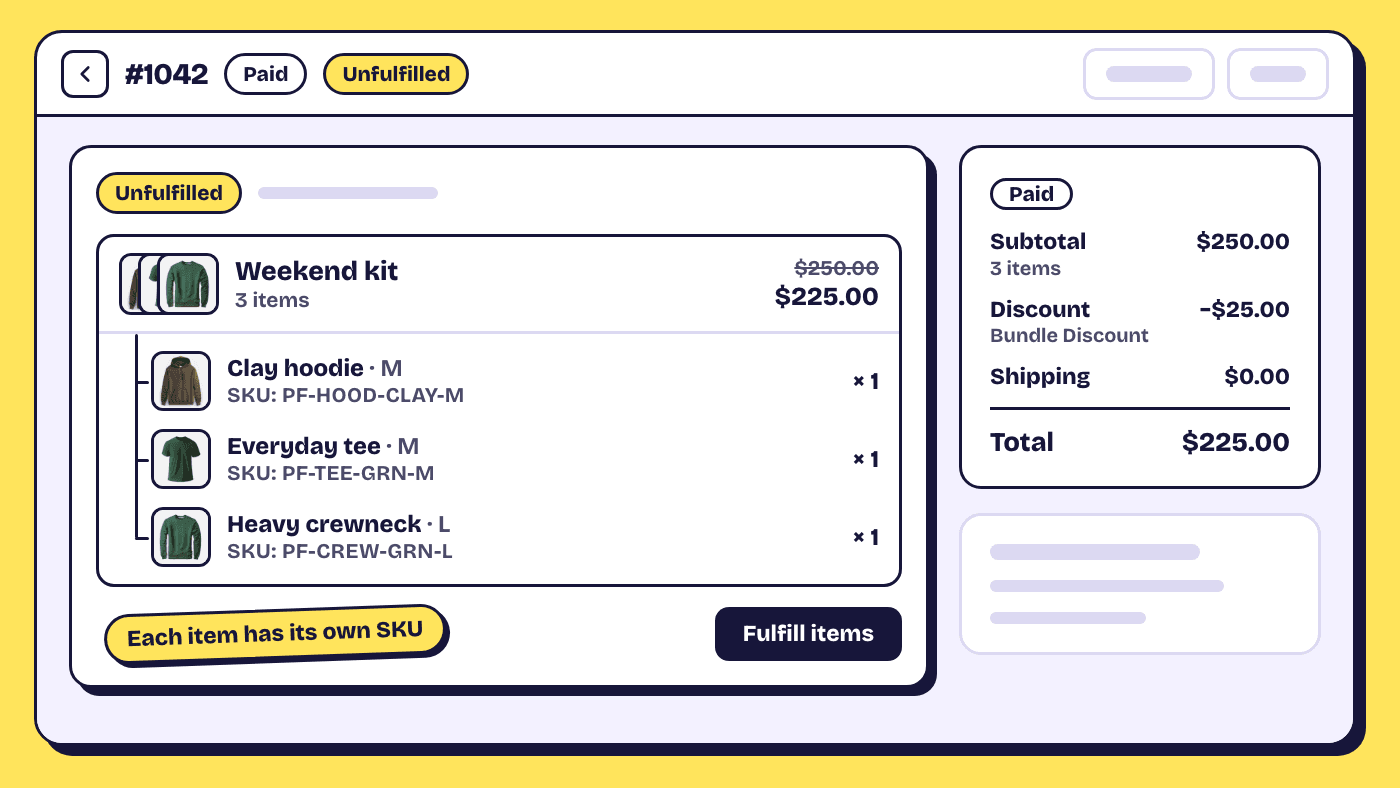
After purchase, the order in Shopify admin lists the bundle as a nested group: the bundle title and price, with the component products underneath. Shopify's developer docs state that order lines return bundle components with a reference to the bundle parent, and that fulfilment apps have access to that bundle information.
For fulfilment this is what a warehouse needs. The pick list is the components, each with its own SKU, weight and location, because those are the real products. Shopify's help centre notes that in areas where each line item is handled separately, such as split fulfilments, the bundle's included items display as individual line items. So a bundle can ship in two parcels if one component is at a different location, and the order tracks each part.
Refunds and returns work per component
Because the components are real line items, a return is handled per product. Shopify's guidance is that the return eligibility of a bundle is based on whether the individual products within it are marked final sale in your return rules, and that returns and exchanges show the included items as individual line items.
If a shopper returns one item from a discounted bundle, you decide how much of the bundle discount to claw back, exactly as you would for a returned item bought with an automatic discount. Shopify allocates the discount across the components on the order, so you can see what each one was sold for before you refund.
Subscription bundles keep their items as separate lines
Subscriptions on Shopify run on selling plans, and the plans come from a subscription app such as Recharge, Appstle, Seal, Loop, Skio or Shopify Subscriptions. That app also bills each renewal. Shopify's own bundles cannot be sold this way: the help centre states that bundles aren't compatible with purchase options, which includes subscriptions.
A bundle builder app works around this by adding the picked products on the plan the shopper chose. The catch is the cart transform: Shopify does not merge lines that carry a selling plan, so a subscribed bundle reaches the cart as separate item lines rather than one bundle line. A one-time purchase of the same bundle still merges as usual.
The discount Function still applies the bundle's tier to the subscribed items, on top of the plan's own saving, as long as the bundle discount is set to apply to subscription orders. The Shopify subscription bundles guide covers the setup in Elite.
What the shopper sees from start to finish
Walking the same path from the customer side:
- On the bundle page they move through steps, picking products and variants, and watch the bundle cart fill up with a savings hint for the next tier.
- They add the bundle. The cart shows one line with the picks beneath it.
- At checkout the discount appears automatically on the order summary.
- The order records the bundle with its components, which is what you see in admin and what fulfilment works from.
None of this needs a discount code, a hidden SKU or a manual price change on the parent product. The how it works page shows the same flow with screenshots from a live store.
Native Shopify Bundles app vs a bundle builder app
Shopify's own free Bundles app handles fixed bundles and multipacks. The help centre is explicit about the split: fixed or multipack bundles can use the free Shopify Bundles app; mix-and-match bundles, where the shopper chooses which products go in, need a third-party app or the Bundles APIs on Shopify Plus. The native app also caps a bundle at 3 options and 100 variants, and it does not update the bundle price when a component's price changes.
So the decision is simple. If you want to sell "the starter kit" as a set price and a set of contents, the native app does it and there is nothing to install. If you want the shopper to pick 3 of 12 snacks, build a skincare routine step by step, or choose a variant per slot in a set, you need a builder. That is the gap build your own bundle and multi-option bundles fill in Elite, on the same cart transform and Function machinery described above, so cart, inventory, orders and returns behave the same way. A comparison of the options is in the post on the best Shopify bundle apps.
One honest caveat. A builder app renders the bundle page through a theme app embed, and that embed has to be switched on in your theme editor. If a bundle page shows a plain product page instead, the embed is off, not the mechanism. It takes about two minutes to fix and it is the first thing support will ask. The Shopify app embed guide shows where the switch is.
Frequently asked questions
Does a Shopify bundle reduce inventory on each product?
Yes. Inventory is tracked on the component products, not on the bundle. Each order deducts the quantity of every component, and the product with the lowest stock decides how many bundles can still be sold.
Do shoppers need a discount code for a bundle discount?
No. The discount is calculated at checkout by a Shopify Function and applied automatically when the bundle reaches a tier. Shoppers see the saving on the checkout summary without entering anything.
Can I fulfil the items in a bundle from different locations?
Yes. The order lists the components as their own line items when fulfilment is split, so one component can ship from a second location and the order tracks each parcel separately.
Elite Bundle Builder runs on this exact machinery and is free with no limits, as the pricing page confirms. Install it from the Shopify App Store.