Blog /
Black Friday bundle ideas for Shopify, 8 set-ups to copy
Black Friday bundle ideas for Shopify with rules, discounts and margin maths, plus a launch plan back from 27 November. Pick two and start building.
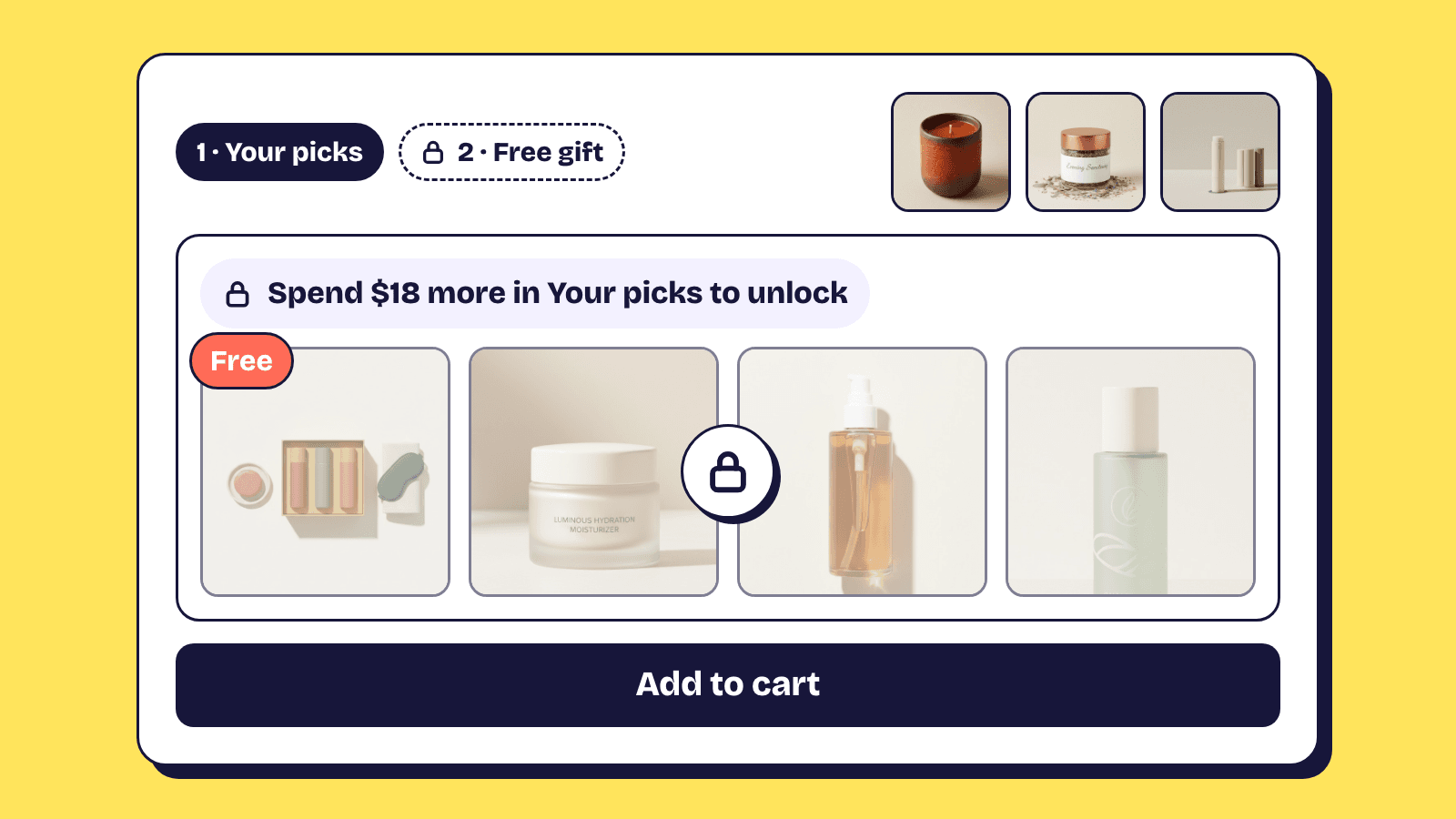
Good Black Friday bundle ideas are the ones you can price, build and test before Friday 27 November, then switch on without touching anything else. Below are eight for a Shopify store, each with who it suits, the rule and discount, the margin in one line, and where to set it up in Elite Bundle Builder.
Then come a launch timeline, how the bundle discount meets the rest of your sale, and what to change after Cyber Monday (30 November). Unlike our everyday mix and match examples, each is shaped for a four-day sale and the gift buying it starts.
Run two or three of these, not all eight
Each bundle is a page to promote and a checkout to test. Three offers a shopper can tell apart at a glance beat eight that blur together.
Each margin line uses the cost next to it, so swap in your own and run the breakeven from the bundle pricing strategy guide. Black Friday is when top tiers get too generous, because everyone else's look generous too.
1. Gift boxes of 3, 5 or 8 items
For products that cost about the same, such as candles, coffee or socks.
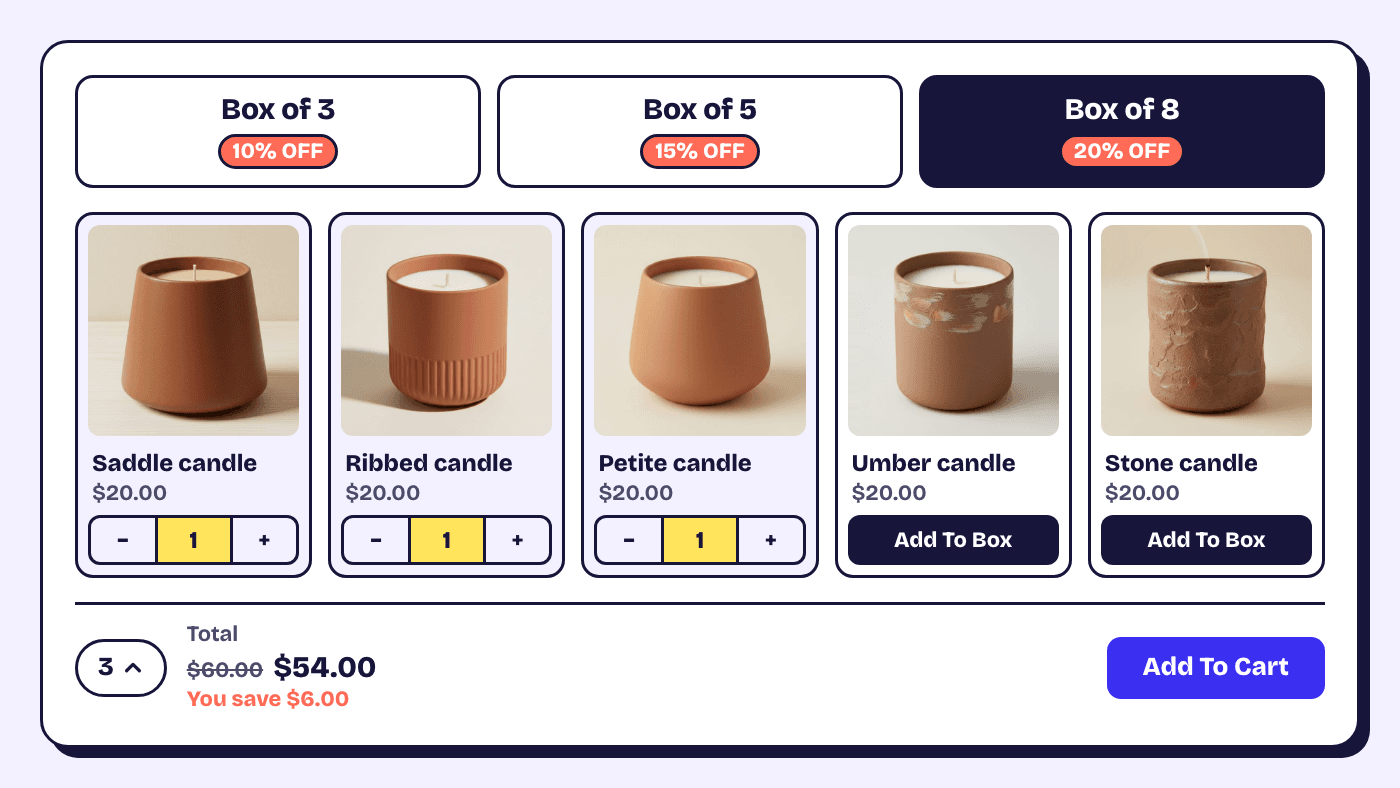
Rule and discount: one step fed by a collection, tiers by quantity of items (3 for 10%, 5 for 15%, 8 for 20%) shown as boxes, with Stop at the top discount tier on so the 8 box locks when full.
Margin: 8 candles at $20 are $160, 20% off takes $128, and $64 of cost leaves $64, against $36 on 3 candles bought at full price outside the bundle, or $30 on the 3 box at 10% off.
Set it up: Offer, Discount offer for the tiers; Design, Discount display, Box, with labels inside so each box shows its saving. The gift box builder guide adds the design, a gift message and a free card.
2. A weekend spend ladder above your everyday one
For a catalogue where a $12 item sits beside a $60 one. Set the first threshold just above your current average order, as the pricing guide explains, and raise the ladder for the four days only.
Rule and discount: trigger by order total value, fixed amount off: spend $75 for $10 off, $125 for $25 off.
Margin: a $125 basket at 55% margin costs $56.25, sells for $100 and keeps $43.75, about a third less than the $68.75 at full price.
Set it up: Offer, Discount offer, then a cart line such as Add {remaining} more for {next}, which counts in money when tiers are by total. The bundle discounts guide works through every calculation type.
3. A free gift once the shopper spends $80
Any store with a cheap, likeable item to give away can run this: a mini, a sample, a candle tin.
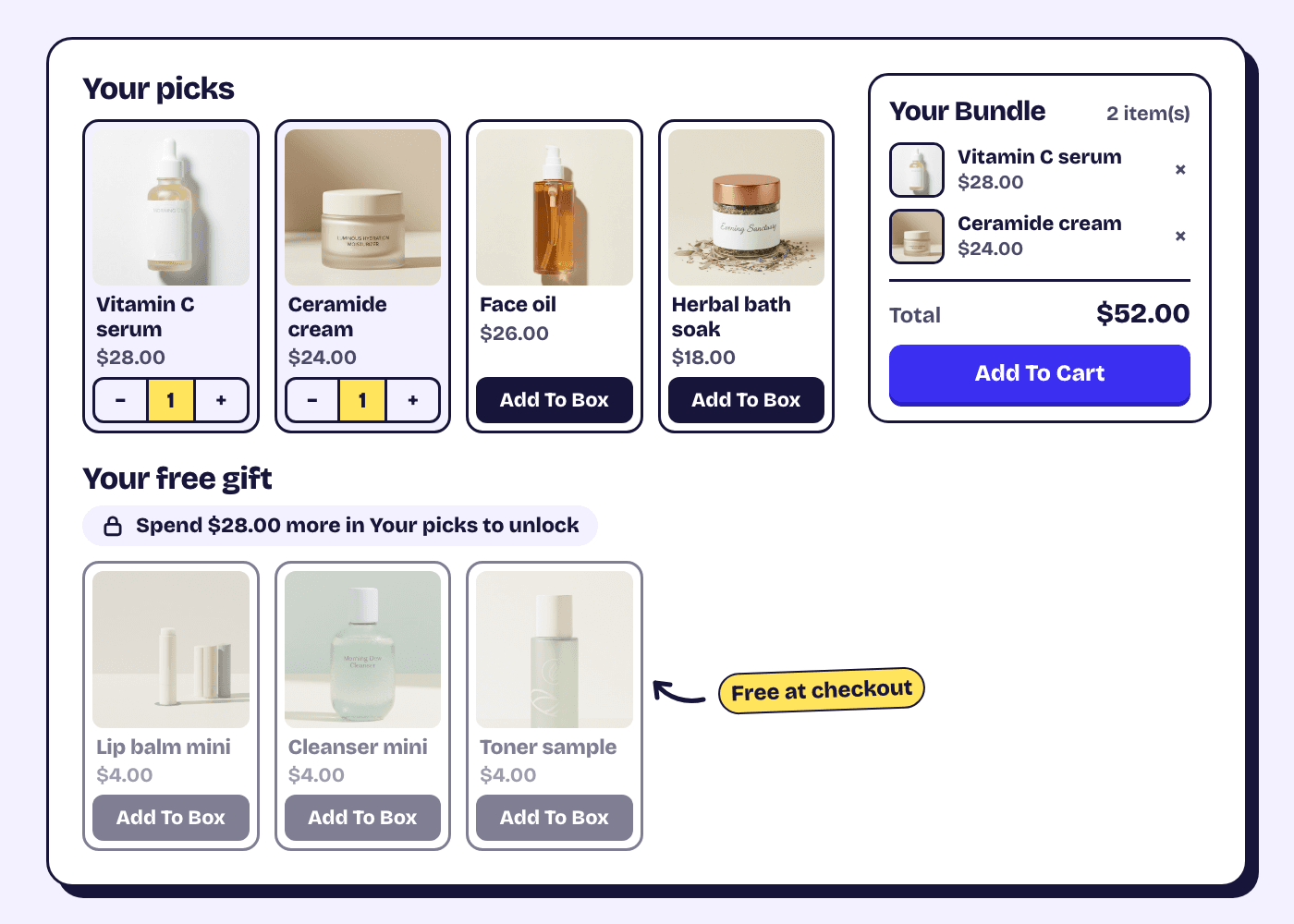
Rule and discount: a paid step, then a free gift step of up to 20 products with a maximum of 1, shown locked until the first step reaches $80.
Margin: an $80 basket at 60% margin keeps $48 and a $4 gift leaves $44, where 20% off would leave $32.
Set it up: in Build, open More options on the last step and turn on Mark this step as a free gift. In Config, Rules, Per step, set Show this step to Based on step 1, Amount spent is at least 80, Until then Show it locked. The condition reads one step, so keep the paid picks in one. The build your own bundle docs cover each rule.
Shopify's own Buy X get Y discount can give a free item too, but shoppers must add it to the cart themselves.
4. A ready-made gift set at one price
Made for shoppers who want a finished gift, and for stores that also sell in person.
Rule and discount: a fixed bundle, Shopify's own bundle product. The price is the offer, with no tiers. Shopify sells it in the Online Store, the Shop app and POS, and a choice sells out as soon as any product in it does.
Margin: three products at $70 list and $28 cost, priced at $59, keep $31 and show the shopper an $11 saving.
Set it up: Bundles, Create bundle, Fixed bundle; add products and quantities in Build, save, then Edit price in Shopify from Publish, Bundle price. The fixed bundle docs list Shopify's limits. Note the everyday price before you lower it.
5. A kit with a choice for each piece
Apparel and gear need this one, where a hoodie, beanie and socks set needs a size and colour for each piece.
Rule and discount: a multi-option bundle with one option per piece, each set to Product with options, and one flat 15% off whenever the kit is added to cart. A last option marked as a free gift makes a pick-your-patch extra.
Margin: $45, $20 and $12 make $77, 15% off takes $65.45, and $31 of cost leaves $34.45.
Set it up: the Options tab for the pieces, the Offer tab for the percentage. The kit uses your theme's own product page and Add to cart.
6. Paid gift wrap and a gift box on any bundle
Any store can add these, and they suit the gifts people start buying on Black Friday.
Rule and discount: a gift box charged once per bundle, gift wrap per item from your own wrap product, and a free gift message. The bundle discount never applies to add-ons, so they keep full price through the sale.
Margin: a $6 gift box that costs $2 keeps $4 on every bundle that takes it, untouched by the 20% tier.
Set it up: Offer, Add-ons. On Bundle add-ons, pick Gift box at a fixed amount and Gift message, free. On Product add-ons (build your own bundles only), pick Gift wrap at A product's price, so it shows sold out when your wrap product does. The paid add-ons guide has every setting.
7. A subscription box with the deal on the first order
Coffee, supplements or pet food stores can use Black Friday to start a subscription instead of ending at one order.
Rule and discount: a build your own bundle sold one-time or on subscription, with the bundle discount on the first subscription order only. Plans come from your subscription app, with every product in one plan.
Margin: a $40 box on a 10% plan is $36, a 20% tier makes the first order $28.80 and keeps $12.80 on $16 of coffee, and each renewal at $36 keeps $20.
Set it up: Config, Subscriptions to connect the plan, then the app's Settings, Bundle discount, Apply to subscriptions, A set number of orders, 1. It covers every bundle in the store, so say "first order" in the plan's Savings badge or Name shoppers see under Config, Subscriptions, or in Settings, Language & Texts. The subscription bundles guide has the full set-up.
8. Early access by link for your email list
For stores with an email or SMS list to reward before the crowd.
Rule and discount: the public bundle and tiers, still Unlisted, with the link sent to your list a day early. An Unlisted bundle opens by direct link only.
Margin: no new maths, but a forwarded link gets the same price, so never give it a tier you would not give everyone.
Set it up: keep the status Unlisted, click View live and put the link in your email. Keep its upsell off until it goes Active, because upsell cards show for Unlisted bundles too.
Last-minute buyers need a gift card, not a box
Some Cyber Monday shoppers are buying for a date your shipping cannot meet. Sell them a Shopify gift card on its own product page. On Shopify's free themes from version 9.0.0 (Dawn and the Horizon family), gift cards can show recipient fields, including a Send on date, so the card arrives by email on the day.
How the bundle discount meets the rest of your sale
Build your own and multi-option bundle offers in Elite Bundle Builder share one automatic discount, however many bundles you run. Shopify allows at most 25 active automatic discounts, app ones included.
That discount can meet a store-wide sale or free shipping in the same cart. Under Shopify's rules for combining discounts, both apply only when each one allows the other; otherwise the shopper gets the better one. Tick what the bundle discount may combine with under Combines with in the app's Settings, Bundle discount, check that your other discounts' Combinations allow it too, and test the exact mix at checkout.
Launch timeline back from 27 November
The app has no scheduler: saved changes and status changes go live at once. Shopify discounts start and end at the dates and times you set, read in your store's time zone (Settings, General, Store defaults), not your shoppers'; the Black Friday discounts guide has the times to use.
- By Friday 30 October: pick your ideas, run the margin sums, order stock and packaging.
- By Friday 6 November: build each bundle, or duplicate an everyday one, and keep it Unlisted.
- By Friday 13 November: test at checkout, on a phone too: the first tier, the top tier, a cart that qualifies for nothing, a free gift, a paid add-on, and every code or automatic discount you will run beside them. If you will publish a Black Friday theme, turn on the Elite Embed Core app embed in it now, because app embeds are saved per theme.
- By Friday 20 November: set your Shopify discounts to run from 12:00 am on Friday 27 November to 12:00 am on Tuesday 1 December, schedule the sale page or blog post with its Visibility date, and queue the emails. On Shopify Plus, Launchpad can schedule theme changes and product visibility too. Then freeze theme, app and price changes.
- Thursday 26 November: send the early access link. Nothing else changes until launch.
- Friday 27 November: set the bundles to Active first thing, turn on their upsells, add them to the menu and homepage, and place one real order.
What to change after Cyber Monday
On Tuesday 1 December, put tiers back to everyday levels, or set the Black Friday copies to Draft and the everyday bundles back to Active. Draft keeps a bundle for next year; deleting one also deletes its Shopify product, and the app cannot undo that. Restore fixed bundle prices in Shopify.
Keep the gift boxes and add-ons running under a December banner. Then open bundle analytics for 27 to 30 November. Each number is compared with the four days before, not last year. The top buyers table, which marks new and repeat buyers, is your January follow-up list.
Frequently asked questions
Can I schedule a bundle to go live on Black Friday?
Not inside the app: a status change takes effect at once, so set the bundle to Active yourself on the day. Shopify's own discounts take start and end dates.
Should I make new bundles for Black Friday or edit my everyday ones?
Duplicate the everyday bundle and keep the copy Unlisted until launch. Saved changes go live at once, so editing the live bundle changes it for shoppers while you test. After Cyber Monday, set the copy to Draft and keep it for next year.
Is a free gift cheaper than a deeper discount?
Usually, when the gift costs you little. On an $80 basket at 60% margin, a $4 gift leaves $44 of margin and 20% off leaves $32. The gift also gives the shopper a reason to reach the threshold.